Introduction
This documentation introduces the Volume Studies Module , which allows you to view, manage, and analyze data related to traffic volume studies in your jurisdiction.
1. Access the Volume Studies Module
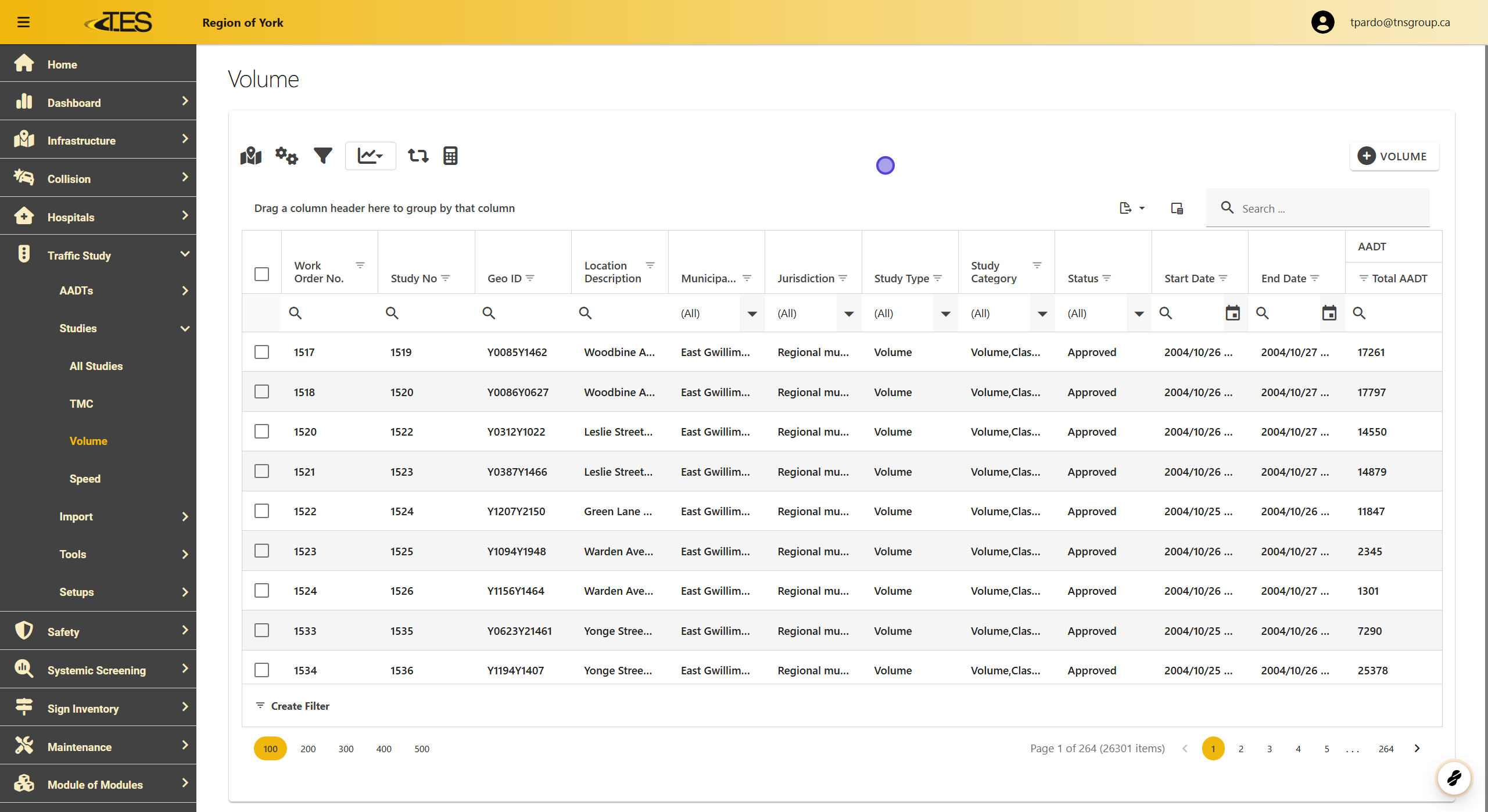
The Volume Studies Module displays a grid containing all the volume studies in your jurisdiction. Each row provides key information, including:
-
Study Number
-
GEO ID
-
Location Description
-
Municipality and Jurisdiction
-
Study Type and Category
-
Import Status
-
Start and End Dates
-
Total AADT (Average Annual Daily Traffic)
Customizing Columns:
Use the Column Chooser to display additional details, such as the AADT for each approach and the volume for each road user.
2. Select a Volume Study
To access detailed information about a study:
-
Browse the grid to locate the desired study.
-
Click on the row corresponding to the study you want to analyze.

3. Details View
Each Volume Study contains the following tabs:
-
Details Tab
-
Location Tab
-
Work Order Tab
-
Volume Raw Data Tab
-
Results Summary Tab
-
Road Segment AADT Tab
-
Attachments Tab
-
Validations Tab
Note:
- Volume studies and speed studies include Road Segment AADT data and raw data for two approaches (unlike four in TMC studies)
