AADT Reports
This documentation goes over the reports that can be created for AADTs.
1. Intersections AADT Reports
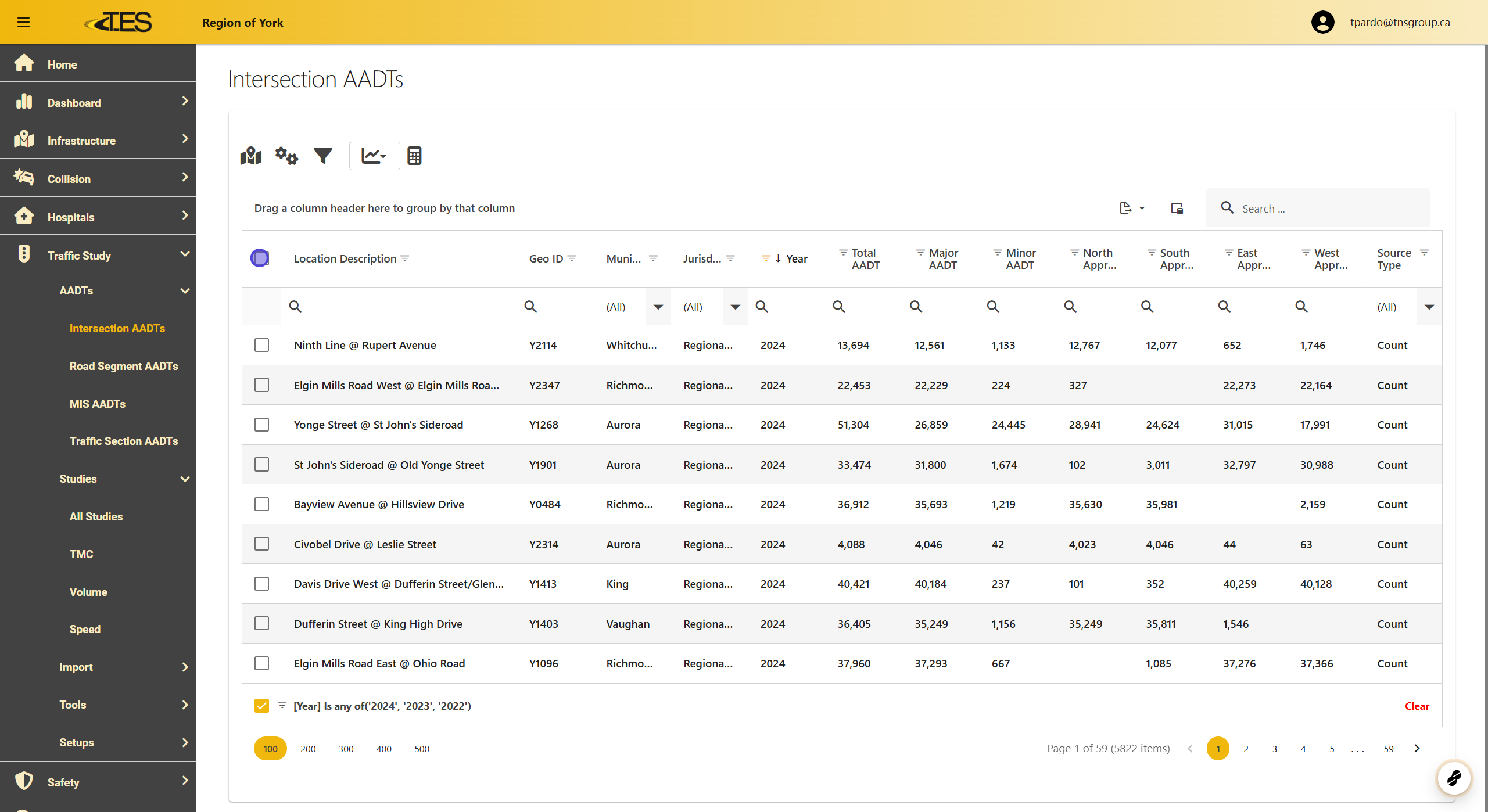
To generate a report for intersection AADT data:
-
Navigate to Intersections AADT in the AADT module.
-
Select the intersections you want to include in the report.
This view displays a table of intersection data for reference.
2. Select a Report
Click on the report icon above the table to choose the type of report. Available options include:
-
AADT Intersection
-
AADT Intersection Detail

3. AADT Intersection Report
This report displays the total AADT (Average Annual Daily Traffic) for each location across all years the data was collected.

4. AADT Intersection Report
This report shows:
-
Total AADT
-
Major AADT
-
Minor AADT for each intersection across all years the data was collected.

5. Road Segments AADT Report
To generate a report for road segment AADT data:
-
Navigate to Road Segments AADT in the AADT module.
-
Select the road segments you want to include in the report.
This view displays a table of road segment data for reference.

6. Select AADT Road Segment Detail
Click on the report icon above the table to select Road Segment Detail as the report type.

7. AADT Road Segment Detail Report
This report displays:
-
Total AADT
-
Major AADT
-
Minor AADT for each road segment across all years the data was collected.
